Know where you stand: your weighted grade, the exact score you need on the final, and semester and cumulative GPA. Try any what-if. No account, all on your iPhone.
Know where you stand in every course. GradeCalc turns your grades into the one number that matters and the exact score you need next.
THE ANSWER FIRST
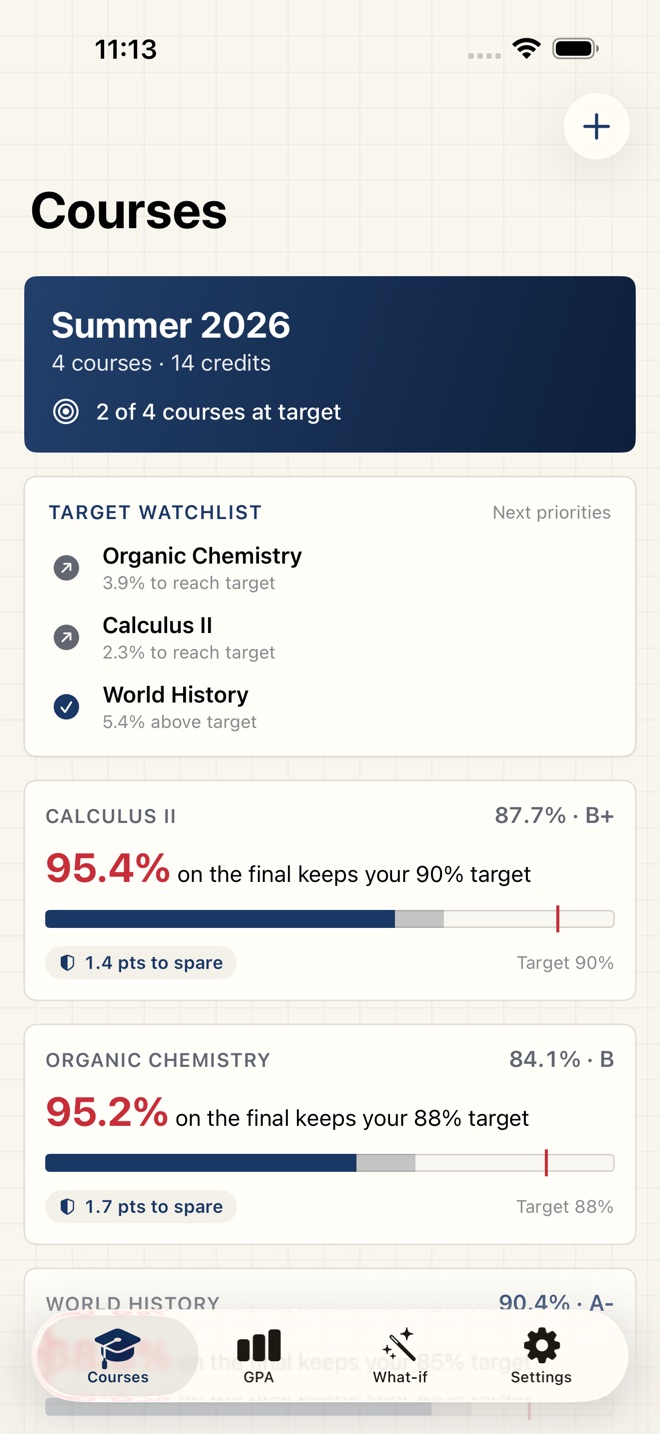
Every course card leads with the verdict: the exact score on the final that keeps your target, written in red. A grade ledger shows what is already banked, what was dropped, and what is still in play, with a points-to-spare chip that says how much you can still lose and make it.
WEIGHTED GRADES
Set up categories like Homework, Quizzes, and Midterms with the weight each carries, log your scores, and watch your real course grade update instantly.
WHAT YOU NEED ON THE FINAL
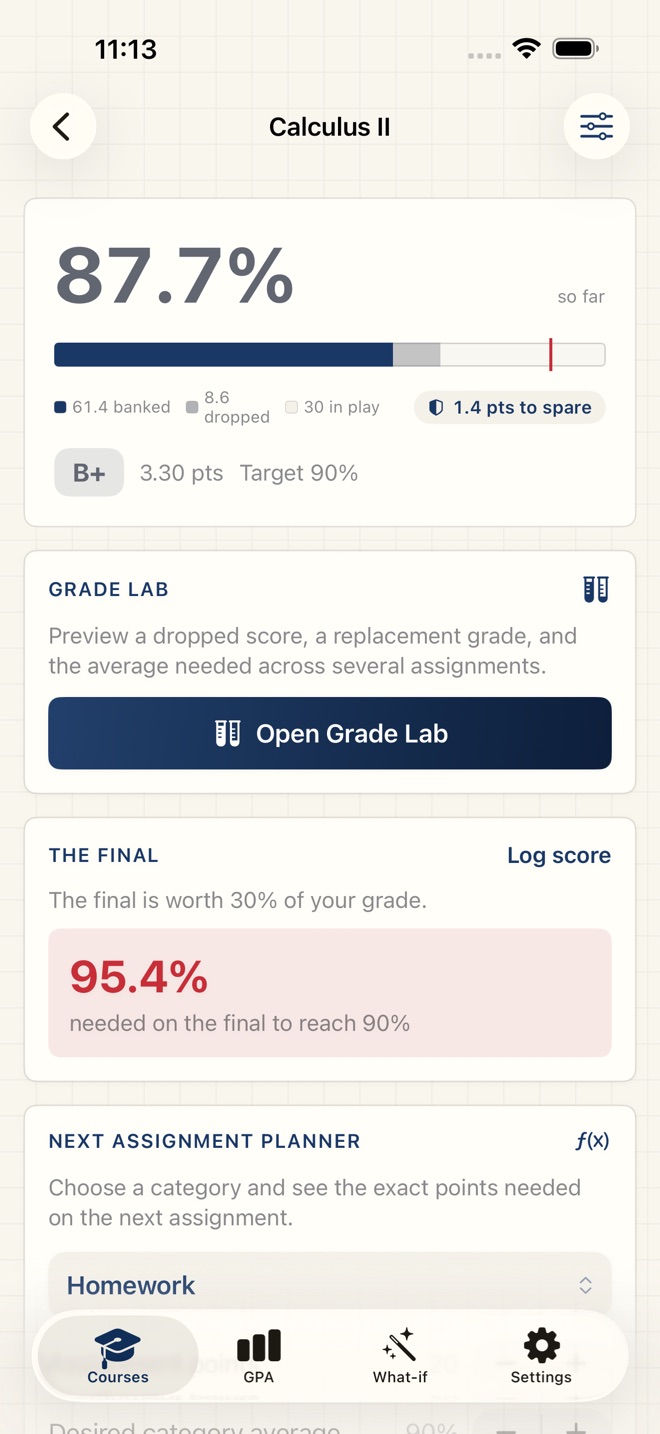
Tell GradeCalc your target and it solves the exact score you need on the final exam. It is honest at the edges too: when the target is already secured, or out of reach, it says so.
SEMESTER AND CUMULATIVE GPA
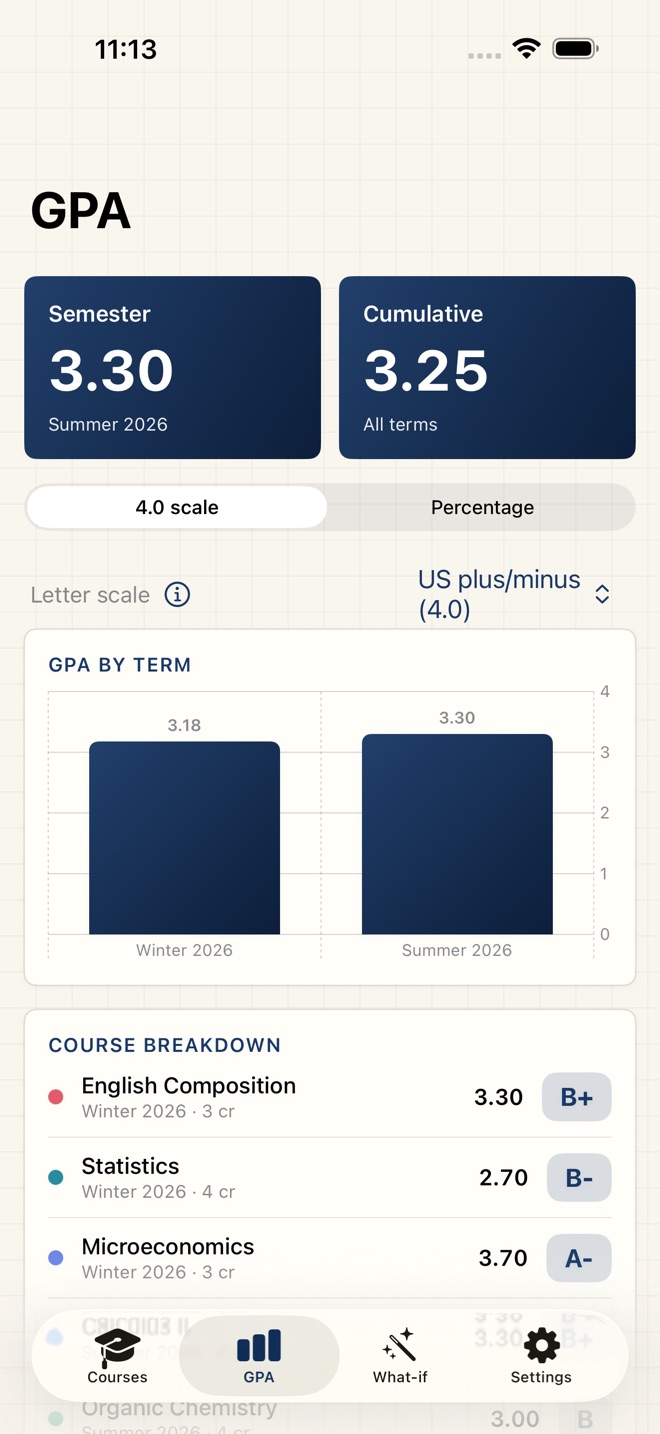
See your semester GPA and your cumulative GPA across every term, with a per-term trend. Pick the scale your school uses: US plus/minus on 4.0, the 4.3 A+ scale, whole letters, or a credit-weighted percentage.
WHAT-IF SCENARIOS
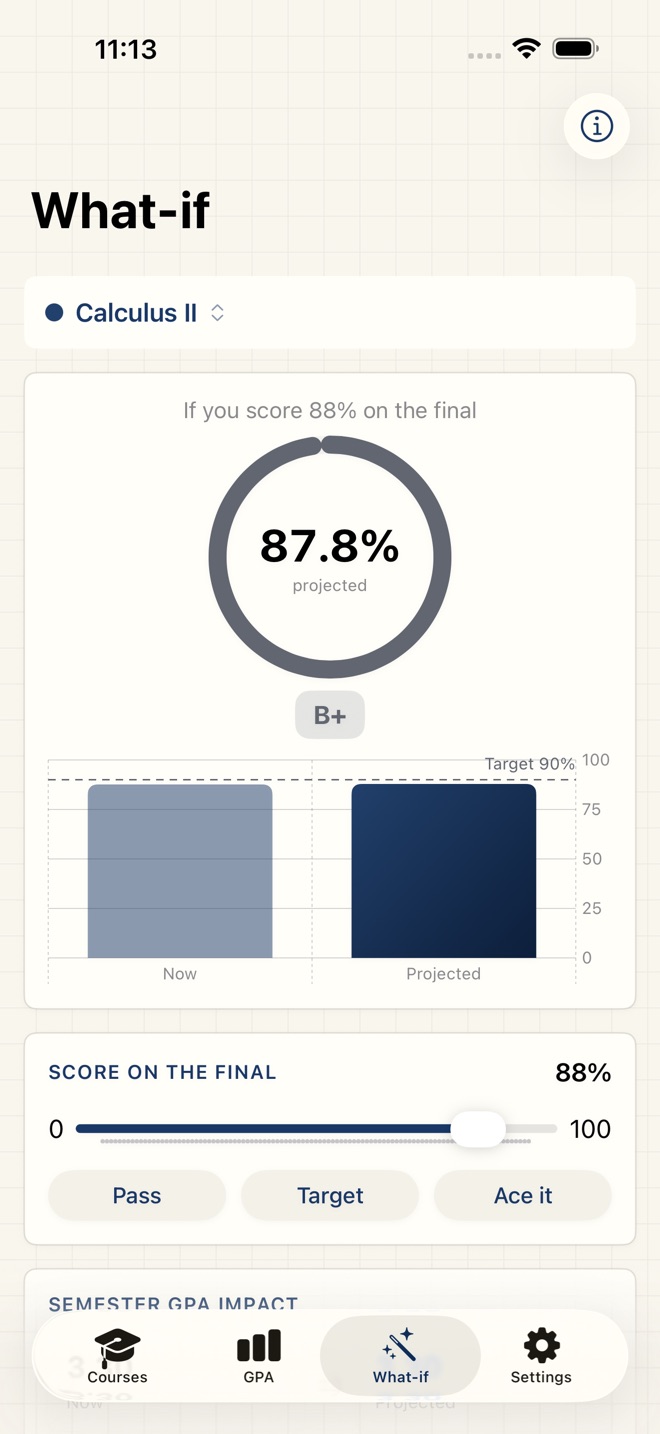
Try any score on the final and watch your projected course grade, letter, and semester GPA move in real time.
GRADE LAB
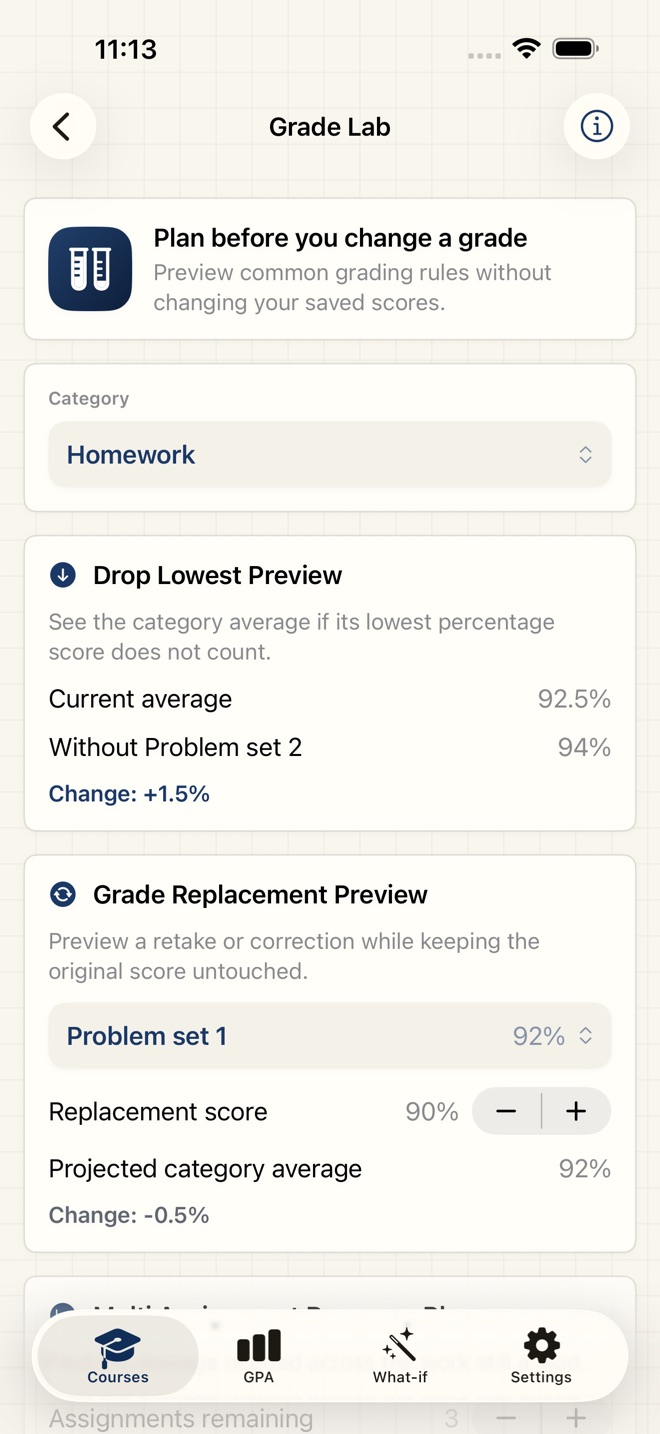
Preview what happens if a teacher drops your lowest score, replaces a grade after a retake, or asks you to recover across several assignments. Every preview leaves your saved grades untouched.
TRACK EVERY COURSE
Keep all of your courses in one place, each with its own categories, target grade, and credits.
EXPORT
Share a semester report PDF or a CSV of every grade straight from the share sheet, ready to print or keep.
PRIVATE BY DESIGN
No account, no cloud, no tracking. Everything you enter stays on your iPhone.
FREE AND PRO
Free tracks one course with its weighted grade and the final-score solver. Every Pro option unlocks all of your courses, semester and cumulative GPA, what-if scenarios, Grade Lab, and PDF and CSV export. Choose a monthly or yearly subscription, or pay once for Lifetime access. The current price is shown in the app before you buy.
GradeCalc Pro is offered as a monthly subscription, a yearly subscription, or a one time Lifetime purchase. The current price is shown in the app before you buy, and prices can change at any time and vary by country. Pro subscriptions renew automatically until cancelled. Payment is charged to your Apple Account at confirmation. Cancel anytime in Settings > Apple Account > Subscriptions; cancellation applies at the end of the current period. Terms: Apple Standard EULA https://www.apple.com/legal/internet-services/itunes/dev/stdeula/
What’s new · 1.2.7
GradeCalc 1.2.7 is a full refresh, built around the answer you actually need.
Course cards now lead with the verdict: the exact score on the final that keeps your target, written in red at the top of every card on the Courses tab.
New grade ledger on every course: one bar shows what is already banked, what was dropped, and what is still in play, with a red tick at your target. A points-to-spare chip tells you how many points you can still lose and make it.
The course screen shows your grade large with the same ledger and a banked, dropped, and in-play breakdown under it.
New letter scales on the GPA tab: US plus and minus, the 4.3 A+ scale, or whole letters. Your choice changes letters and grade points everywhere, including exports.
A cleaner look throughout: exam paper in light mode, chalkboard in dark mode.
New info buttons on the trickier screens: tap the circled i on What-if, the Grade Lab, the grading editor, or the letter-scale picker for numbered steps that show exactly what to set up and where.
Also fixed: the assignment planner and Grade Lab now keep your chosen numbers when you navigate away and back, and a mistyped final score can no longer distort a course grade. Exporting the PDF report in dark mode no longer produces an unreadable black page, reports always print on clean white paper now, the CSV exports as a real file instead of loose text, and both files carry the report date and time in their names.
Missing a feature?
Your ideas help shape our apps. Tell us what would make your app more useful.
We review requests to understand what would help. Timing depends on scope, priorities and App Store review.
GradeCalc combines weighted categories, recorded scores and a target grade. Start with the grading rules in your course syllabus so the calculation reflects your course.
Set up the course weights
Add categories such as homework, quizzes and midterms with the weight each carries. Use your syllabus rather than assuming every assignment counts equally.
Log your scores
Record the scores you have received and review the weighted course grade. Keep each course’s categories, target and credits separate.
Choose a target and check the final
Enter your target grade to solve the required final-exam score. For example, if completed work contributes 70 percent at a grade of 80, and the final is the remaining 30 percent, a target of 85 requires about 96.7 on the final. This example assumes no other ungraded work or special grading rules.
Explore a scenario before changing records
Pro what-if tools project a final score’s effect on the course grade and semester GPA. Grade Lab previews dropped scores, retakes and recovery across assignments while leaving saved grades untouched.
Turn a grade target into planned study sessions with StudyBeat for subject objectives, focus blocks and exam study-hour targets. The apps keep separate records.
Common questions
What if my target needs more than 100 on the final?
GradeCalc reports when a target is out of reach or already secured. Review the course weights and remaining work, then check any extra-credit or rounding rules with your instructor.
Does GradeCalc support different GPA scales?
Pro supports semester and cumulative GPA with US plus/minus on 4.0, the 4.3 A+ scale, whole letters or a credit-weighted percentage. Choose the scale your school uses.
Can I calculate a final-exam target for free?
Free includes one course, its weighted grade and the final-score solver. Pro adds all courses, GPA, what-if scenarios, Grade Lab and PDF or CSV export.
Where can I download GradeCalc: Grade Calculator?
Use the App Store link above to see availability, supported devices and current purchase options in your region.
What is the current App Store version?
1.2.7
Where can I find the privacy details?
Read this app’s privacy policy using the link below. Storage, sync and optional online features are specific to each app.