
SiteSnap: Jobsite Photos
Before, during, and after photo records for every job. The photo date is read at import. Build a client-ready PDF photo report, on iPhone and iPad.
Download on theApp StoreWhen a client asks what the kitchen wall looked like before demo, you need the photo and its date. SiteSnap keeps both, organized by job.
SiteSnap is the jobsite photo log for contractors, renovators, and trades. Every photo lands in a project, inside a before, during, or after album, with its date read at import and a caption built for job records: room, note, issue, resolution.
How Dates Work
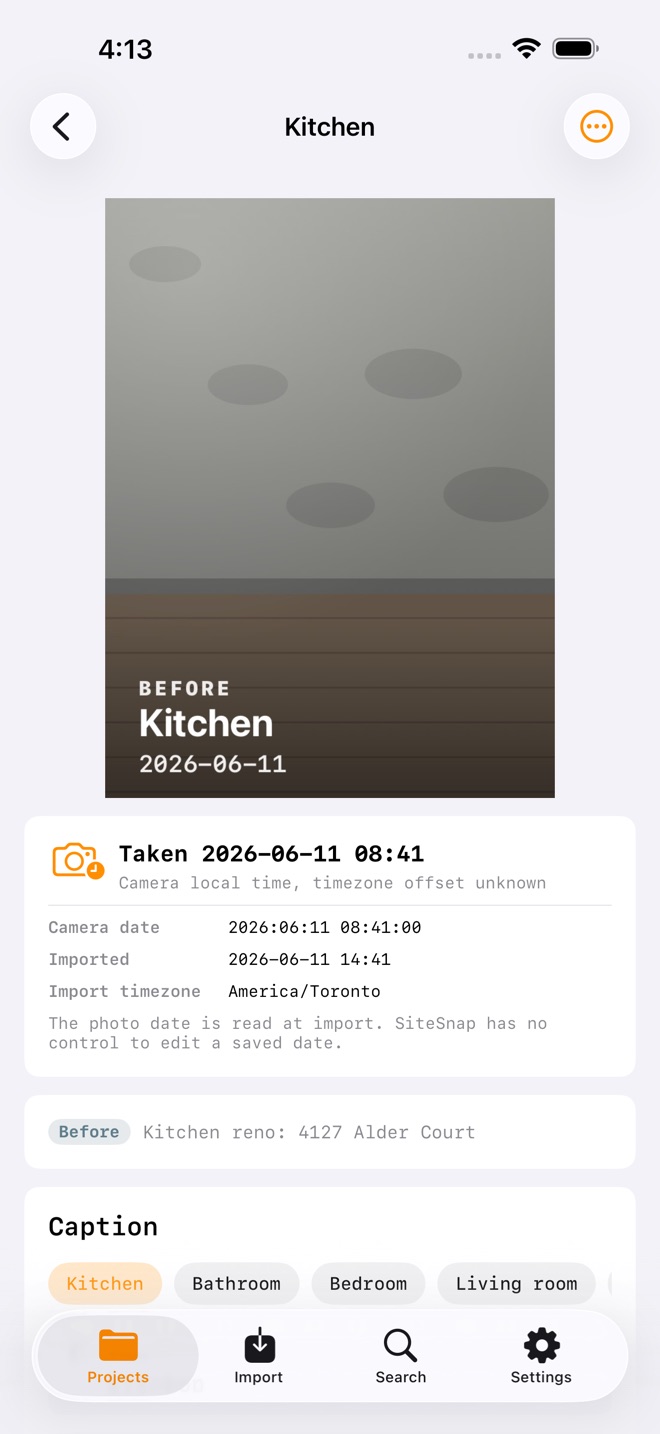
SiteSnap reads the capture date from the photo's own data the moment you import it and labels it Taken. When a photo carries a timezone, the exact moment is recorded; without one, it is saved as the camera's local time. If a photo has no capture date at all, it is labelled Imported with the import date, so the source of every date is always stated. SiteSnap does not provide an in-app control to edit a saved date.
What You Get
- Projects with phase albums: before, during, after
- Photo import that reads dates from the photo's own data, cleans hidden metadata like location from the stored copy, and detects exact duplicates
- A structured note on every photo: room, free note, issue, resolution
- Client-ready PDF photo report: choose the phases, date range, and business fields to include, preview every page, then share
- A watermarked sample report preview on the free plan, so you can see the artifact before upgrading
- Search across notes, rooms, issue text, and project names, with Pro filters by project, phase, date, and unresolved issues
- Batch tools with Pro: move photos between phases, set rooms, resolve issues, delete in one pass
- Archive completed jobs: off the main list, still searchable
- Full backup to a single file, and restore, on every plan
- A home screen widget with generic phase counts and an Add Photos shortcut
- Native on iPhone and iPad
- Private by design: your records stay on your device, with no account and no tracking
Free Vs Pro
Free: 1 active project, 10 stored photos, full captions, search, archiving, the watermarked sample report, backup and restore, and the widget. Pro: unlimited projects and photos, the full client PDF report with sharing and report options, advanced search filters, batch tools, and widget detail options. Choose a monthly or yearly subscription, or a one-time lifetime purchase. Prices are shown in the app before you buy.
Pro subscriptions renew automatically until cancelled. Payment is charged to your Apple Account at confirmation of purchase. Cancel anytime in Settings > Apple Account > Subscriptions; cancellation takes effect at the end of the current period. Lifetime is a one-time purchase, not a subscription. Privacy policy: https://innovalabworks.com/a/sitesnap/privacy. Terms of use: Apple Standard EULA, https://www.apple.com/legal/internet-services/itunes/dev/stdeula/




More in this category




SiteSnap: Jobsite Photos does one job well, works offline, and keeps your data on this device. There is no cloud sync, no account, and nothing to sign up for.
Who it is for
SiteSnap: Jobsite Photos is for anyone who wants a dependable way to handle this without a spreadsheet or a complicated setup. It sits in the Business category on the App Store.
Private by design
No ads, no trackers, no data harvesting, and no cloud sync. Your entries stay on this device and never pass through our servers. There is a Delete All My Data control, so you stay in charge.
Common questions
What is SiteSnap: Jobsite Photos?
Before, during, and after photo records for every job. The photo date is read at import. Build a client-ready PDF photo report, on iPhone and iPad.
Is SiteSnap: Jobsite Photos on the App Store?
Yes. It is available now on the App Store.
Does SiteSnap: Jobsite Photos work offline?
Yes. Everything runs on your device, so it works with no signal.
Does SiteSnap: Jobsite Photos work on iPad?
Yes. It is a universal app and runs natively on iPhone and iPad.
Does SiteSnap: Jobsite Photos include in-app purchases?
Some advanced features require an in-app purchase. The App Store shows the current choices, prices, and terms for your storefront before you confirm anything.
Read the SiteSnap guide · Contact support · Privacy
← All InnovaLabWorks apps